

Built for Enterprise AI Agents

The agent-first, confidential compute inference engine.

The world's first confidential compute inference engine, built for the agentic era. Lifeboat handles the repeated model calls, tool chaining, and long-running context that overwhelm traditional inference engines — while protecting data even while it's being processed, not just at rest or in transit. Run more concurrent agents on existing GPUs while maintaining full model quality and keeping data inside your perimeter.

Modern server room with digital data flow graphics over racks of network servers and a workstation nearby.

Lifeboat runs seamlessly across the AI infrastructure spectrum—from NVIDIA DGX Spark and RTX PRO systems to enterprise GPUs including H100, H200, B300, and beyond, with full support for AMD ROCm.

What is Lifeboat?

Lifeboat is the world's first confidential compute inference engine — an LLM inference engine purpose-built for the concurrency and long-running context that agentic AI workloads demand, with confidential compute built directly into the engine to protect data in use. It runs on infrastructure enterprises already own, delivering 2-6x more concurrent capacity on the same GPU hardware while eliminating per-token cloud costs and keeping data inside the enterprise perimeter.

2x+

concurrent agent sessions on the same GPU, depending on the model

100%

model quality — weights stay full-precision, never quantized

129x

faster response under heavy agent load than standard engines

1st

World's first confidential compute inference engine

Download Lifeboat

Native app, no Docker required. Or run the container on a GPU server.

Platform File Notes
macOS — Apple Silicon (M1–M4), 13+ Lifeboat-2.2.40-macos-arm64.dmg 199 MB
macOS — Intel, 13+ Lifeboat-2.2.40-macos-x86_64.dmg 48 MB
Linux — Debian/Ubuntu x64 lifeboat-desktop_2.2.40_amd64.deb 43 MB
Linux — Debian/Ubuntu arm64 lifeboat-desktop_2.2.40_arm64.deb 38 MB
Linux — any distro, x64 Lifeboat-2.2.40-linux-x86_64.tar.gz 62 MB
Linux — any distro, arm64 Lifeboat-2.2.40-linux-aarch64.tar.gz 56 MB
Windows x64 Coming soon

Both Mac builds are signed with an Apple Developer ID, notarized by Apple and stapled — they open with a double-click, with no security warning, and work offline. Linux builds need glibc 2.31 or newer (Debian 11+, Ubuntu 20.04+, RHEL 9+). The desktop app uses port 30800.

Why agents break traditional inference

Agents changed the workload. Most inference engines never caught up.

A single chatbot question is one model call. A single agent task can be dozens — planning, tool calls, MCP roundtrips, retries, and reflection, all riding on a conversation that keeps growing.

That changes the physics of inference:

The result: teams buy more GPUs to run fewer agents than they expected, or they fall back to per-token cloud APIs and hand over both their data and their cost ceiling.
Context windows fill fast
Multi-turn agent conversations rapidly expand the KV cache, the GPU memory required to maintain context for each active session.
Latency climbs as context grows
The longer the context, the harder each token works the hardware — so responses slow down right when the agent needs to keep moving.
Concurrency collapses under load
As sessions get heavier, the number of agents a GPU can serve at once falls off a cliff. Standard engines can stall at four or five concurrent long-context requests.
What Lifeboat does

The engine that keeps agents fast — and keeps them all running.

Lifeboat is purpose-built for the way agents actually consume inference. Instead of treating every request like an isolated chatbot prompt, it manages memory, scheduling, and model precision for fleets of long-running, tool-using agents on shared hardware. Four things make that possible:

01
Fair scheduling so no agent starves
TRSS-style scheduling and admission control give every agent session its fair slice of the GPU. A heavy document-processing agent can't choke out the interactive ones, and the system stays responsive instead of falling over during peaks.
02
Compress the cache, not the weights
TurboQuant and H2O cache optimization compress the KV cache—the memory that fills up in agent conversations—while model weights stay at full BF16 precision. You get concurrency headroom from compression without the quality loss of quantizing the model your agents reason with.
03
The right expert at the right moment
For mixture-of-experts models, Lifeboat swaps in the specialist experts each agent actually needs, so you serve large MoE models efficiently instead of paying to keep every expert resident for every request.
04
Dynamic quantization across the stack
Lifeboat tunes precision on the fly across these techniques, squeezing more usable capacity out of the same silicon without forcing a one-size-fits-all tradeoff.
05
Every session runs inside a security capsule
Security capsules provide secure guardrailing and secure sandboxed execution for
every agent session — per-session input/output filtering, token budgets, and resource limits — without full containerization overhead.

The payoff: 2x or more concurrent agent sessions on the same GPU, full model quality intact, and performance that holds steady as load climbs.

Business impact

Squeeze more out of every GPU you already own.

2x+ more concurrent agents per GPU
Depending on the model, Lifeboat roughly doubles — or more than doubles — the number of agent sessions a single GPU can serve. That's twice the work from hardware you've already paid for.
Run mid-range models efficiently — 32B to 120B parameters
Lifeboat is tuned to run the mid-range models that power most real agent workloads at full quality, on accessible hardware, without the cost and complexity of frontier-scale clusters.
Built for air-cooled data-center GPUs like the RTX PRO 6000 Blackwell
You don't need exotic, liquid-cooled infrastructure. Lifeboat is optimized for the air-cooled, data-center-ready GPUs enterprises can actually buy and deploy today.
Better performance per watt
More concurrent sessions on the same card means more useful work per watt — lower power and cooling cost for the same agent throughput.
Scales gracefully as load increases
Instead of degrading sharply when demand spikes, Lifeboat holds throughput and response times steady, so agent performance stays predictable as you grow.
Cluster management & operations

Manage your whole inference fleet — including the engines you already run.

Lifeboat isn't just a faster engine. It's a managed control plane for inference at scale, with a built-in cluster manager that orchestrates Lifeboat across nodes — and manages your other inference engines alongside it. One place to deploy, route, monitor, and govern the GPUs serving your agents.
Browser-based control plane
Servers, models, clusters, and a test playground — no CLI needed
Multi-node clustering
Discover, fit-check, and deploy across the fleet from the UI
Token-aware routing
Weighted routing and capacity gates to prevent cluster overload
Manage external engines too
Bring existing inference deployments under one operational roof
RBAC + audit
Role-based access with every action logged and exportable
OpenAI-compatible API
Keep the dev experience and model choice teams expect"
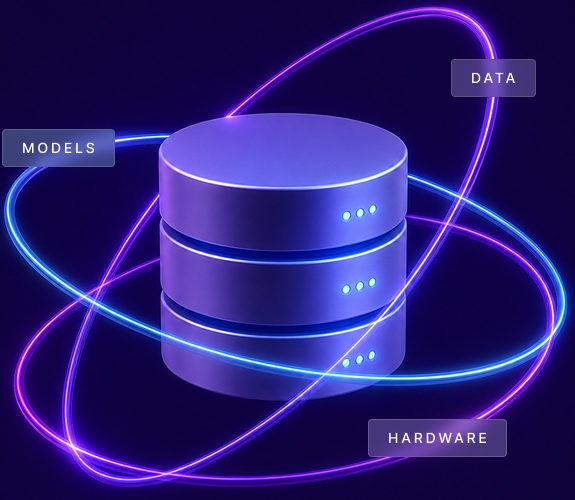
True AI sovereignty

Your agents, your data, your hardware.

Owning your agent workloads means owning the layer they run on. Lifeboat delivers true private AI by keeping inference inside your perimeter — your data governed by your policies, your models tuned and controlled by you, and your hardware under your control, whether on-premise or cloud VPC, to the edge. No prompts on third-party servers, no per-token meter, no vendor lock-in.
3-tier server with glowing blue and purple rings labeled data, models, and hardware orbiting it.

Data

Your data stays where it belongs — inside your perimeter, governed by your policies, and never exposed to shared AI services.

Models

Use, tune, and control the models that power your workflows. Own what you build instead of depending on opaque external systems.

Hardware

Run inference on infrastructure you control — on-premise or cloud VPC — and edge deployments.

Performance benchmarks

Measured against the same engine with Lifeboat's optimizations disabled, on a single NVIDIA RTX PRO 6000 Blackwell GPU.

Benchmarks used a Qwen 30B A3B model and long-context workloads that simulate real enterprise agents processing large documents in parallel.

KV Cache Capacity

568K

tokens with Lifeboat vs. 284K with the baseline
Max concurrency

2,048

sessions at 100% request success
Throughput at 2,048

8,714

tokens per second vs. 4,965 with the baseline
p99 ttft at 128 Sessions

1.5s

vs. 189s with the baseline under pressure
Metric
Lifeboat
The Baseline
Result
KV cache capacity
568K tokens
284K tokens
2.0x memory efficiency
Max concurrency at 100% success
2,048
1,024
2x more sessions
Throughput at 1,024 concurrent
9,611 tok/s
6,304 tok/s
52% faster
Throughput at 2,048 concurrent
8,714 tok/s
4,965 tok/s
76% faster
Success at 2,048 concurrent
2,048 / 2,048
1,282 / 2,048
63% success rate
Memory pressure test

At 128 concurrent sessions, Lifeboat keeps responding.

In an 18K-token-per-request workload, the baseline's p99 time to first token reaches 189 seconds. Lifeboat holds p99 TTFT to 1.5 seconds, a 129x improvement.
Lifeboat
1.5s
The Baseline
189s

Runs on NVIDIA/AMD GPUs

Lifeboat ships a native ROCm build alongside the CUDA one — the same control plane, the same OpenAI-compatible API, the same dashboard, validated end-to-end on AMD Instinct hardware. None of the optimization work is CUDA-specific, so it carries across unchanged.

Validated on hardware

Instinct MI210

Verified end-to-end through the control plane: GPU inventory, model download, tensor and GGUF engines, streaming, embeddings, load balancing and automatic memory sizing.

Measured

475 tok/s on one card

Qwen3-Coder-30B-A3B (Q4_0 GGUF) on a single MI210: 133.8 tok/s single-stream, 475.8 tok/s aggregate at 16 concurrent sessions.

No extra setup

No container toolkit

AMD GPUs are passed straight through as /dev/kfd and /dev/dri. Nothing to install on the host beyond ROCm and Docker.

Your hardware Image tag Size Notes
Any NVIDIA GPU
(Ampere → Blackwell)
iterateai/lifeboat:latest ~17 GB Multi-arch: resolves to x86_64 or ARM64 automatically
Instinct MI210 / MI250
(CDNA2)
iterateai/lifeboat:latest-rocm ~28 GB Also published as :amd. Validated on hardware
Instinct MI300X / MI325X
(CDNA3)
iterateai/lifeboat:amd-mi300x ~28 GB Adds native FP8, which CDNA2 has no silicon for
Instinct MI350X / MI355X
(CDNA4)
iterateai/lifeboat:amd-mi355x ~28 GB Adds native FP4
No GPU / integrated GPU /
AWS Graviton
iterateai/lifeboat:lite ~720 MB No driver and no container toolkit

Pull the tag that names your card. The engine's GPU kernels are compiled per AMD generation — the FP8 number format differs between CDNA3 and CDNA4, so one build cannot be correct for both. The GGUF engine inside every AMD image covers all three generations. :latest is the NVIDIA image. An AMD host needs :latest-rocm; a host with no GPU needs :lite. A container image can only select on CPU architecture, not GPU vendor, so one tag cannot serve all three. Lifeboat warns at startup if it finds a GPU it was not built for.

The Lite image serves quantized (GGUF) models on the CPU or an integrated GPU. The GPU-efficiency optimizations above require the tensor engine and do not apply to it.

Beyond Performance: Built for Production AI

Performance is only part of the challenge. Production AI requires governance, orchestration, security, and operational controls that raw inference engines don't provide. Lifeboat combines high-performance inference with the infrastructure required to run AI at scale.

Capability
Ollama
vLLM
Lifeboat
Best Fit
Local Development
Production Inference
Production AI Platform
2× KV Capacity Without Weight Quantization
Partial
Admission Control & Fair Scheduling
Web-Based Control Plane
RBAC & Audit Logging
Multi-Node Orchestration
Partial
Security Capsules (Inline Session Security)
Self-Hosted & Air-Gap Deployment
Confidential Compute Inference

Before you install — host requirements

Lifeboat runs three ways: as a native desktop app on macOS or Linux, or as a Docker container on a GPU server or a machine with no GPU at all. There is one Docker image per target — NVIDIA hosts pull iterateai/lifeboat:latest, AMD hosts pull iterateai/lifeboat:latest-rocm, and a host with no GPU pulls iterateai/lifeboat:lite. The installer detects which you have, checks every requirement and fixes anything missing, but here's the list for reference:


Requirement
Minimum
Why
Deployment
Desktop app (macOS/Linux) · Docker container (GPU) · Docker container (no GPU, :lite)
Three ways to run; rows below apply to the container on a GPU server
Desktop app
macOS 13+ (Apple Silicon or Intel), or Linux with glibc 2.31+; 8 GB RAM
No GPU and no Docker required; port 30800
OS
Linux (Ubuntu 22.04+, RHEL 9+, Rocky 9+, Amazon Linux 2023)
Container runtime + CUDA (NVIDIA) or ROCm (AMD) toolchain
CPU architecture
x86_64 / ARM64
GPU kernels are x86_64 / ARM64 / Graviton
NVIDIA/AMD GPU
≥ 1 device, ≥ 8 GB VRAM — or none, with :lite
Inference target
GPU driver
NVIDIA ≥ 580.65.06
AMD ROCm ≥ 6.3
Ships the CUDA 13 runtime on NVIDIA; the amdgpu kernel module and ROCm userspace on AMD
Docker Engine
≥ 25.0
Native CDI device support
Docker Compose
≥ 2.21
CDI in
deploy.resources
Container GPU access
NVIDIA nvidia-container-toolkit
AMD none required
CDI passthrough on NVIDIA; on AMD the GPU is passed as the /dev/kfd and /dev/dri device nodes
Disk
≥ 50 GB free — ~3 GB with :lite
Image + 1-2 models
Open inbound port
8001/tcp
Web UI + OpenAI-compatible API
Cloud customers: any AWS / GCP / Azure GPU instance type satisfies the GPU requirements (g5/g6/p4 on AWS; a2/a3 on GCP; NC/ND on Azure).
AWS Marketplace customers: your AMI handles everything.
Small machines: Decode speed is limited by memory bandwidth, not core count. On an 8 GB machine a 1.5B–4B model at 4-bit is comfortable, 8B is the ceiling, and 14B will not fit.

Choose the right Lifeboat plan for your team

Enterprise LLM inference server — deploy, manage, and serve models on your own GPU infrastructure.
Non-Commercial

Developer License

Free
Up to 2 concurrent inference servers, single node.
Confidential computing not included. Non-commercial and evaluation use.
Always Free
Get started fast

Standard License

$49.99
Per month
7-day free trial
No card required
Try for Free
Most secure

Confidential Computing

$499.99
Per month
7-day free trial
No card required
Try for Free
OpenAI-compatible API
✓ Included
✓ Included
✓ Included
Web-based control plane (dashboard)
✓ Included
✓ Included
✓ Included
Model architectures supported
168+
168+
168+
GGUF quantized model support
✓ Included
✓ Included
✓ Included
Multi-GPU tensor parallelism (TP 1/2/4/8)
✓ Included
✓ Included
✓ Included
Multi-node cluster management
✓ Included
✓ Included
✓ Included
Token-aware load balancer
✓ Included
✓ Included
✓ Included
Role-based access control (RBAC)
✓ Included
✓ Included
✓ Included
API key management & audit log
✓ Included
✓ Included
✓ Included
HuggingFace token vault (encrypted)
✓ Included
✓ Included
✓ Included
Prometheus metrics & observability
✓ Included
✓ Included
✓ Included
Inference optimizations (FP8 KV cache, fair scheduling)
✓ Included
✓ Included
✓ Included
AWS Marketplace AMI
✓ Available
✓ Available
✓ Available
Hardware TEE detection & attestation
✓ AMD SEV-SNP / Intel TDX
Model weights encrypted in-use (TEE-sealed)
✓ Included
GPU CC mode attestation (NVIDIA H100 / H200 / B100 / B200 / GB200 / GB300 / RTX PRO 6000 Blackwell Server Edition)
✓ Included
Inference start-gating on verified attestation
✓ Included
Compatible cloud platforms
Any NVIDIA/AMD GPU instance (AWS / GCP / Azure / on-prem)
Azure NCC H100 v5, GCP Confidential VM + H100, on-prem — see requirements below.
Support level
None
Standard
Priority
Requirements: Confidential computing requires both halves, and both are checked at startup:
  • CPU: Intel Xeon with TDX, or AMD EPYC with SEV-SNP — and the workload must run inside the confidential VM.
  • GPU: NVIDIA H100, H200, B100/B200, GB200/GB300, or RTX PRO 6000 Blackwell Server Edition, in CC mode.
Not sufficient: desktop or workstation CPUs (Core i9, Ryzen); Intel TME, which is not TDX; bare metal instead of a confidential VM; AMD GPUs; or the RTX PRO 6000 Blackwell Workstation/Max-Q editions.
Professional Support: Professional support is available exclusively with paid Lifeboat subscriptions. Non-commercial, free, and trial versions of Lifeboat do not include professional technical support from Iterate.ai.
Industry use cases

Private inference for sensitive, high-volume agentic workloads.

Woman in scrubs reviewing documents at desk with laptop in a clinical office setting.

Healthcare

Clinical documentation, radiology reports, discharge summaries, drug discovery, and reasoning over patient records.
Two professionals reviewing information on a laptop in a modern office setting.

Financial services

Earnings analysis, SEC filing review, risk assessment, fraud detection, and auditable internal research.
A man and woman in business attire reviewing a laptop together at an office desk.

Legal

Contract review, redlining, vendor risk analysis, and compliance monitoring with attorney-client confidentiality.
Two factory workers wearing helmets and orange vests inspecting metal parts on a production line.

Manufacturing & energy

Equipment maintenance prediction, safety document analysis, and edge or private data center operational intelligence.
Young man in camouflage jacket sitting at a desk working on a computer with code on the screen.

Government & defense

Air-gapped deployment for classified workloads with FedRAMP-aligned security architecture and no external API calls.

Frequently asked questions

What is Lifeboat?

Lifeboat is the world's first confidential compute inference engine — an
enterprise-grade, self-hosted LLM inference platform that combines high-performance
model serving with a complete operational control plane.
Confidential compute is
built directly into the engine, protecting data even while it's being processed.
It delivers roughly 2x concurrent user capacity per GPU without quantizing model
weights, while providing a web dashboard, role-based access control, audit logging,
security capsules for sandboxed session isolation, and multi-node cluster
orchestration—all behind an OpenAI-compatible API.

How does Lifeboat improve GPU efficiency?

Lifeboat uses patent-pending optimizations including FP8 KV-cache compression, TurboQuant vector quantization, adaptive memory management, and fairness-aware scheduling to roughly double concurrent-session capacity on the same GPU hardware. These optimizations compress the cache while keeping model weights at full BF16 precision, preserving output quality.

What deployment options does Lifeboat support?

Deploys as a hardened Docker container, a Helm chart on Kubernetes, or a native desktop app for macOS and Linux. Supports air-gapped, on-premise or cloud VPC environments. All state is managed via an embedded SQLite database, enabling deployment in restricted and regulated environments.

Is Lifeboat compatible with existing LLM applications?

Yes. Lifeboat exposes an OpenAI-compatible API, making it a drop-in replacement for existing OpenAI client code. It also supports Anthropic and Ollama protocol compatibility, working seamlessly with LangChain, LlamaIndex, LiteLLM, and other standard LLM client libraries.

What security features does Lifeboat include?

Lifeboat provides four-tier role-based access control (RBAC), API key management
with lifecycle controls, encryption at rest for secrets, comprehensive audit
logging with CSV export, container hardening (non-root user, dropped capabilities,
read-only filesystem), and optional TLS/HTTPS support.
Every session runs inside a
security capsule for secure guardrailing and sandboxed execution, and confidential
compute protects data while it's actively being processed. It's designed for
self-hosted deployment — on-premise or cloud VPC — to keep private AI data within
your environment.

How many model architectures does Lifeboat support?

Lifeboat supports 168+ model architectures. New architectures are absorbed automatically with a single upgrade command, ensuring broad and current model support.

Does Lifeboat support multi-node GPU clusters?

Yes. Lifeboat includes multi-node cluster orchestration with a control-plane node and node agents on each GPU host. It features token-aware weighted load balancing, capacity gating, and intelligent routing across cluster nodes, all managed through a unified gateway and web dashboard.

What's included in Lifeboat's management interface?

Lifeboat provides a comprehensive web dashboard covering real-time metrics, server lifecycle management, a searchable model catalog with capability probing, cluster orchestration, user and API key management, configuration presets, and a full audit trail—turning inference operations into a point-and-click experience with no terminal required.

Does Lifeboat run on AMD GPUs?

Yes — Lifeboat ships a native ROCm build for AMD Instinct alongside the CUDA one. It is the same control plane, dashboard and OpenAI-compatible API, validated end-to-end on an Instinct MI210. Pull iterateai/lifeboat:latest-rocm instead of :latest — a container image is selected by CPU architecture rather than GPU vendor, so one tag cannot serve both. AMD hosts need no container toolkit; the GPU is passed through as the /dev/kfd and /dev/dri device nodes. Kernels are compiled per CDNA generation, so there is one image for MI210/MI250, one for MI300X/MI325X and one for MI350X/MI355X. The only feature that is NVIDIA-only is GPU confidential computing, which has no AMD equivalent; on AMD it reports as unsupported and inference runs normally.

Full documentation for installation, configuration and the API: docs.iterate.ai/lifeboat